What’s New in Presence: More Context Behind Every Alert
Discover what’s new in Pistachio Presence, with richer alert context, Custom AI Context, enhanced low-risk event details and improved canary visibility.
Following conversations with our customers, we've added a number of new features to Presence, our insider threat detection product, focused on one thing: giving IT teams more context to act on alerts.
Presence learns what normal looks like for every user and flags when something breaks the pattern. Think of a departing employee downloading the customer list, or a compromised account accessing SharePoint from a different country. Setting up that kind of detection manually through rules in Microsoft Purview takes significant time and ongoing effort that most non-enterprise IT teams don't have.
This release focuses on what happens when an alert is triggered: helping you understand the alerts you receive and decide what to do about them.
Alerts that explain themselves
Spotting unusual activity is the first step. Deciding what to do about it is the next. Why is this a threat to your organisation? What activity led to the alert? Where should you start looking in Microsoft Purview?
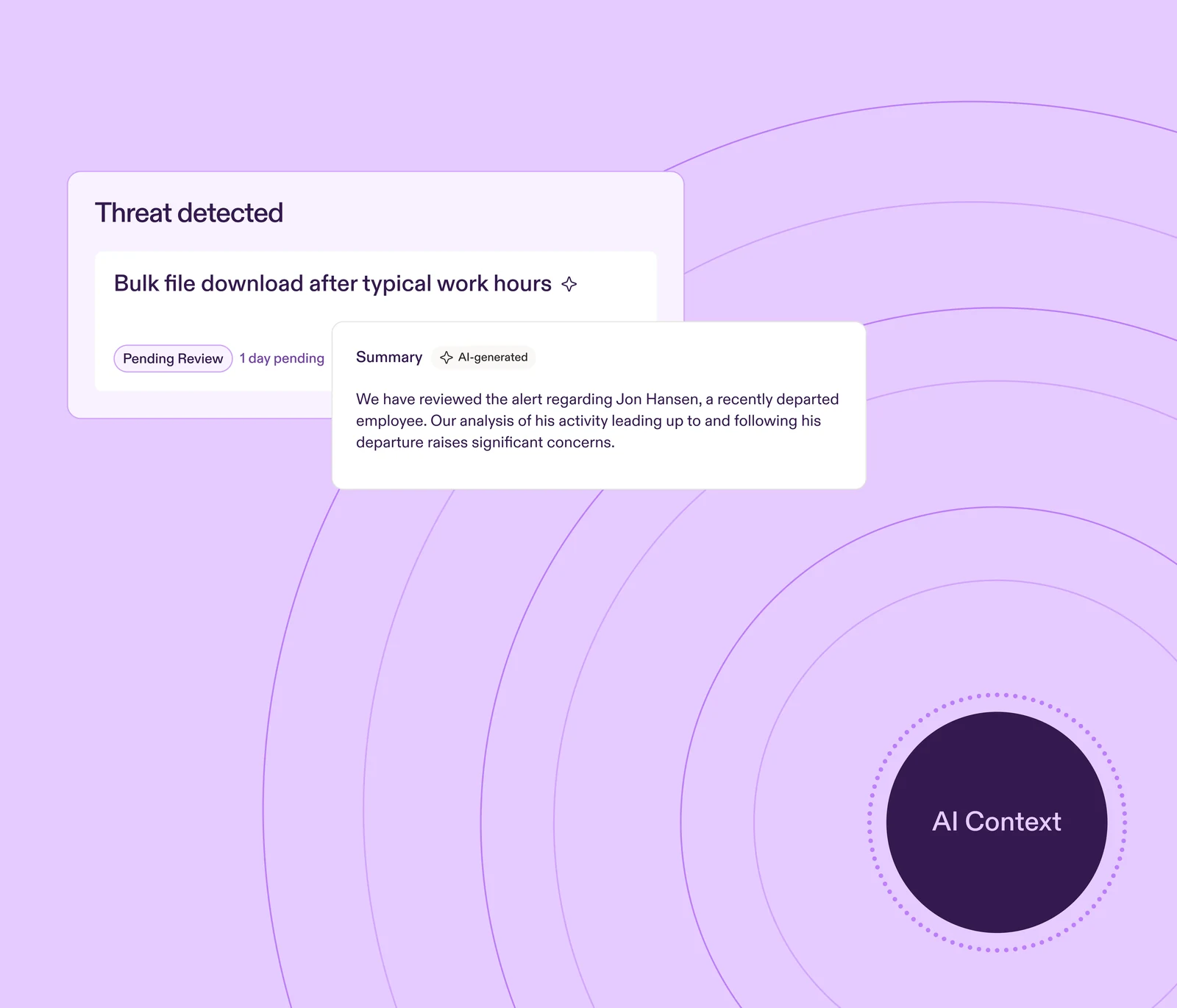
Advanced alert cards answer those questions upfront. Each alert starts with an AI-generated summary of what happened and why it was flagged, along with the details relevant to the investigation:
Why the activity was considered suspicious
Relevant dates and timing
File names and SharePoint locations
IP addresses
Other context relevant to the detection
You can start with a specific alert instead of hunting through logs. You see the situation first, then dig into the underlying activity if you need to.
Giving Presence context about your organisation
Presence can detect unusual activity across a wide range of organisations. But every organisation has context that only matters inside it, and that Presence can't know on its own.
With Custom AI Context, admins can add that information directly, including:
Internal project names
Sensitive SharePoint locations
Keywords or terminology
Departments
Roles
For example, an organisation might use a Norwegian acronym to mark confidential files, or assign a specific Entra role to temporary external collaborators. Neither would necessarily look sensitive without that organisational context. With AI Context, Presence can take that organisation-specific information into account when analysing activity.
A longer view of low-risk activity
Not every event needs an immediate response. But low-risk activity can still be worth reviewing, especially when you can see how it builds up over time.
Low-risk events stay visible in Presence for 30 days, with more detail about the activity behind each one. Rather than only seeing that a user was flagged, admins can:
See what triggered the event
Open it to see which file was involved, who an email was sent to, or what happened around it
Decide whether it warrants further investigation in Microsoft Purview or follow-up with the user
Low-risk events are also included in the Presence PDF report where relevant.
Full visibility of canaries
Canaries are realistic decoy content placed in your environment. When one is interacted with, Presence alerts you straight away, giving you an early signal that an account may be compromised or being misused.
Admins have access to a full log of every canary in their environment, so it's clear what has been placed and where. Canaries are now available in all 12 languages Pistachio supports, so organisations working across multiple languages can deploy them in the languages their users normally see.
Smaller changes that make a difference
Multiple notification recipients. Send Presence notifications to multiple licensed Pistachio admins, rather than having alerts go to one person.
Updated layout. A refreshed design makes key information easier to find and leaves room for the growing depth of detail across the platform.
Detection that's easier to act on
For lean IT teams, detection was only part of the problem. There’s also a gap in knowing what an alert means, whether it matters and what to do next, without needing a dedicated security resource to work it out.
With more context behind each detection, clearer alerts and a longer view of low-risk activity, your team can spend less time piecing together what happened and more time deciding what to do about it.
Presence still deploys in 10 minutes and runs without rules or tuning. Custom AI Context is optional: a quick way to give Presence more to work with, not something you need to maintain. Lean IT teams get the context they need to understand what happened, decide whether it matters and know where to look next, without the manual workload.
Thank you to every customer who shared their feedback and helped shape this release.
Want to see how Presence detects unusual activity and gives your team the context to investigate it? Email contact@pistachioapp.com to book a 15-minute demo.

We believe in a learn-by-doing approach over snooze-worthy videos.
Instead, Pistachio tailors real-world scenarios so your team can build their cyber skills in a safe environment.


Continue reading
Ready to reduce your human risk? Book your demo today.

“We lacked confidence that employees would recognise today’s phishing threats or respond correctly. Since using the Pistachio platform, they are more attentive and proactive in identifying potential risks. The solution is easy to manage, quick to implement, and highly effective.
“The platform is easy to implement and provides clear insights into employee phishing awareness. Its bite-sized learning encourages participation, saves administration time, and allows us to focus more on real threat detection.”
“We were looking for a practical way to improve cybersecurity awareness across the organization. Pistachio made training simple and engaging, and we’ve seen a noticeable improvement in employee awareness with minimal effort.”
“Pistachio removed the burden of planning campaigns, collecting data, and evaluating results. The program challenges each employee at their own level and provides clear, simple reporting. Pistachio has streamlined our awareness training and strengthened our organization’s cybersecurity.”
“Our goal was to help employees better recognize phishing emails and avoid malicious links. Pistachio made this easy and engaging, and we’ve seen a clear improvement in detection, fewer clicks on phishing links, and reduced data disclosure. With minimal ongoing maintenance, it’s an effective and low-effort solution.”
“Within weeks, Presence had flagged several incidents that could have otherwise been missed, including employees forwarding company data to personal accounts during offboarding. The alerts are reliable and actionable, so we've built a full investigation process around them. Although I was skeptical at first, the value was obvious almost immediately.”
“Pistachio has reduced our manual workload to zero with its automated phishing simulations and in‑box delivery of scenario‑based trainings. This has allowed our team to dedicate time to other important security initiatives while Pistachio handles our Security Awareness program seamlessly.”
“Presence automatically detects suspicious behaviour and gives us the visibility we need without constant manual oversight. Within the first few weeks we were already seeing alerts that would have otherwise gone unnoticed as the system learns what is usual and unusual behaviour for our environment.”
“Before Pistachio, security awareness was something we could only offer to a few customers. Today it’s part of every managed service we deliver, and we haven’t had to grow the team to make that happen.”
Fill out the form to book a demo:
Trusted by 1200+ customers & MSPs