New Features: Canaries and Low-Risk Events
New in Pistachio Presence: A clearer view of what’s happening in your organization

Presence is built to understand and identify signs of malicious behavior, whether it's from inside or outside your organization. It develops a clear, contextual understanding of how every user's account normally behaves, so any unusual activity will stand out.
But there are also clear, practical risks that simply need to be surfaced as they happen. For example, admin accounts carry significant weight and need to have safeguards in place to flag compromised accounts at the first sign of misuse. Others are every day, seemingly harmless choices that still introduce unnecessary exposure. Storing passwords in shared documents or using work accounts for personal services may seem minor, but each one creates a small, preventable gap in one's security posture.
To cover both ends of this spectrum, we are introducing two new features to Presence:
Canaries: A built-in alarm that alerts when an admin’s account may be unknowingly in the wrong hands
Low-Risk Events: A 7-day view of low-risk events to help pinpoint areas for strengthening your organization’s security posture
Canaries
Admin accounts are natural targets for attackers. If someone gets in, one of the first things they often do is comb through emails for links or attachments that could give them even more access.
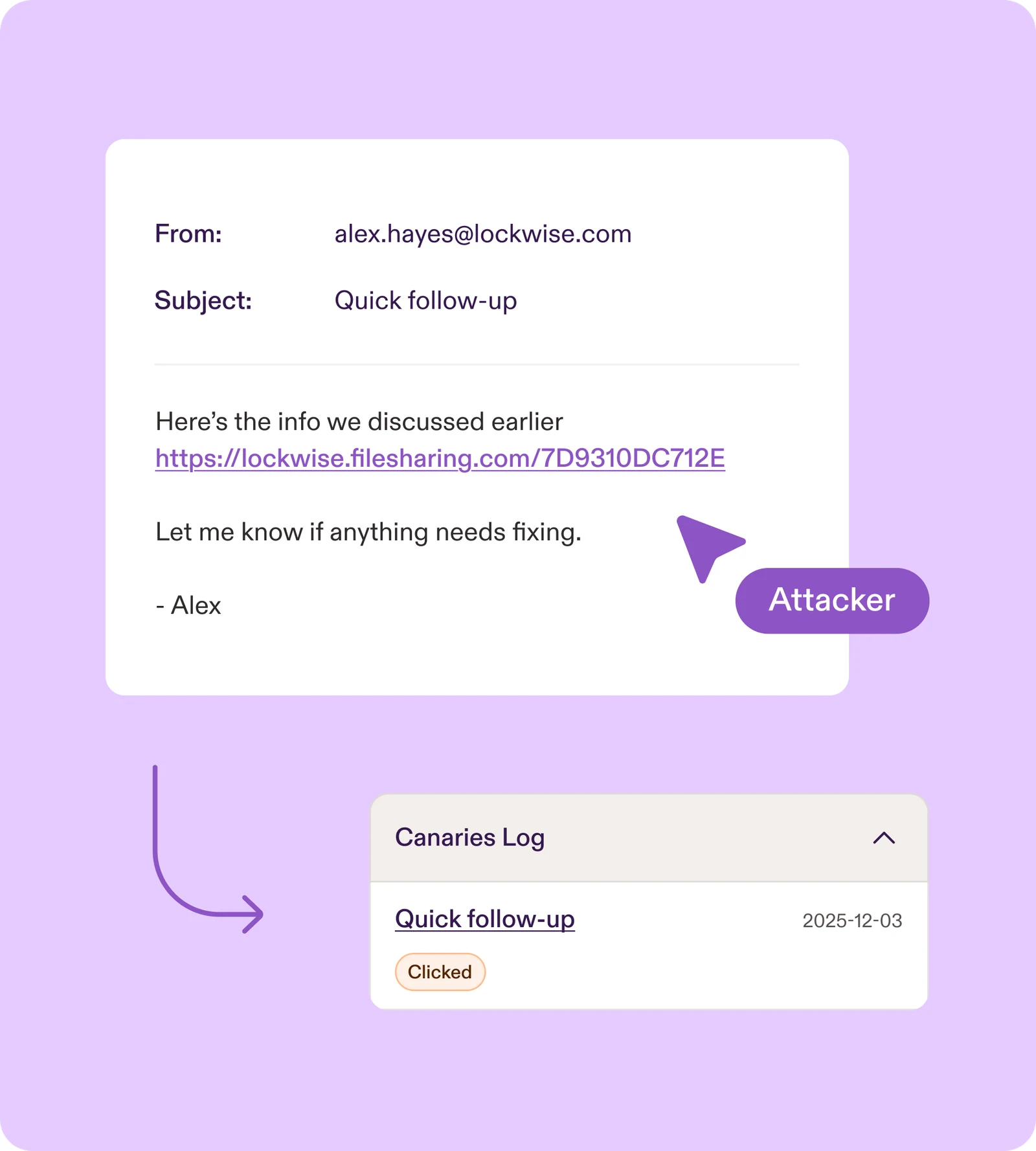
Presence adds an extra layer of protection to every admin account by planting realistic-looking canaries in Outlook. These emails blend seamlessly into everyday activity and are designed to lure in and catch anyone who gains unauthorized access. They:
Are only visible in an admin’s sent mailbox
Look like ordinary emails within your tenant
Contain links that are likely to draw an attacker’s attention
Are added automatically, with no setup required for admins
If someone interacts with a canary by clicking a trap link, Presence immediately notifies your organization that the account may be compromised.
Low-Risk Events
Not every security risk comes from a sophisticated attack or a malicious employee. Often, it’s everyday actions that are well-intentioned or seemingly harmless that leave accounts more exposed than they need to be. Presence now brings these actions together in one place, giving you a clear snapshot of the low-risk events that have introduced small security gaps over the past seven days.
Examples include users storing passwords in shared documents, downloading unsafe content onto the company's network, or using work emails for personal services. On their own, these actions are minor, but each one leaves the kind of opening attackers pay attention to.
A strict seven-day window keeps low-risk events focused on recent behavior instead of historical noise. With fresh, relevant context, small fixes like a quick chat or a minor policy tweak, become easy opportunities to tighten security before issues grow.

A New Way to Stay Ahead
These features give you a clearer view of what’s happening in your organization, helping you stay ahead of potential risks. Canaries alert you the moment an admin account looks to be compromised, while low-risk events highlight areas where small changes could make your team more secure.
Over time, they provide security teams with a realistic, day-to-day picture of activity across the organization, providing the insight needed to intervene early, reinforce good habits, and keep both user and admin accounts safer.

We believe in a learn-by-doing approach over snooze-worthy videos.
Instead, Pistachio tailors real-world scenarios so your team can build their cyber skills in a safe environment.


Continue reading
Ready to reduce your human risk? Book your demo today.

“We lacked confidence that employees would recognise today’s phishing threats or respond correctly. Since using the Pistachio platform, they are more attentive and proactive in identifying potential risks. The solution is easy to manage, quick to implement, and highly effective.
“The platform is easy to implement and provides clear insights into employee phishing awareness. Its bite-sized learning encourages participation, saves administration time, and allows us to focus more on real threat detection.”
“We were looking for a practical way to improve cybersecurity awareness across the organization. Pistachio made training simple and engaging, and we’ve seen a noticeable improvement in employee awareness with minimal effort.”
“Pistachio removed the burden of planning campaigns, collecting data, and evaluating results. The program challenges each employee at their own level and provides clear, simple reporting. Pistachio has streamlined our awareness training and strengthened our organization’s cybersecurity.”
“Our goal was to help employees better recognize phishing emails and avoid malicious links. Pistachio made this easy and engaging, and we’ve seen a clear improvement in detection, fewer clicks on phishing links, and reduced data disclosure. With minimal ongoing maintenance, it’s an effective and low-effort solution.”
“Within weeks, Presence had flagged several incidents that could have otherwise been missed, including employees forwarding company data to personal accounts during offboarding. The alerts are reliable and actionable, so we've built a full investigation process around them. Although I was skeptical at first, the value was obvious almost immediately.”
“Pistachio has reduced our manual workload to zero with its automated phishing simulations and in‑box delivery of scenario‑based trainings. This has allowed our team to dedicate time to other important security initiatives while Pistachio handles our Security Awareness program seamlessly.”
“Presence automatically detects suspicious behaviour and gives us the visibility we need without constant manual oversight. Within the first few weeks we were already seeing alerts that would have otherwise gone unnoticed as the system learns what is usual and unusual behaviour for our environment.”
“Before Pistachio, security awareness was something we could only offer to a few customers. Today it’s part of every managed service we deliver, and we haven’t had to grow the team to make that happen.”
Fill out the form to book a demo:
Trusted by 1200+ customers & MSPs